Fields that match the next step
Required values, pick-lists, and photos attached to the right item—captured in the shape the estimate or report needs.
 Cloud10ANALYTICS
Custom mobile & web apps
Good data starts in the field. When the information you need lives on a job site, a shop floor, or a clipboard, I build the mobile or web app that captures it cleanly—structured from the first tap.
Why this matters
Every dashboard, knowledge base, and automation depends on useful input. Sometimes that information is still in a text message, a photo on someone’s phone, or a form filled out three different ways. That’s when a purpose-built app earns its keep.
Required values, pick-lists, and photos attached to the right item—captured in the shape the estimate or report needs.
Connect field entries to your database, job record, or knowledge base, where supported access is available.
Follow the order your team works in, skip what doesn’t apply, and plan for offline capture when the work requires it.
An example · Upsurv
I built Upsurv for an elevator WBO service company: a mobile app that guides the surveyor through the building, keeping photos and findings with the right equipment and questions.
Submitted surveys feed an AI estimating assistant. The estimator reviews the price, adjusts markup, and handles unusual requirements. The app and estimate generation are in production; proposal generation and document delivery are the next expansion.
See the full case study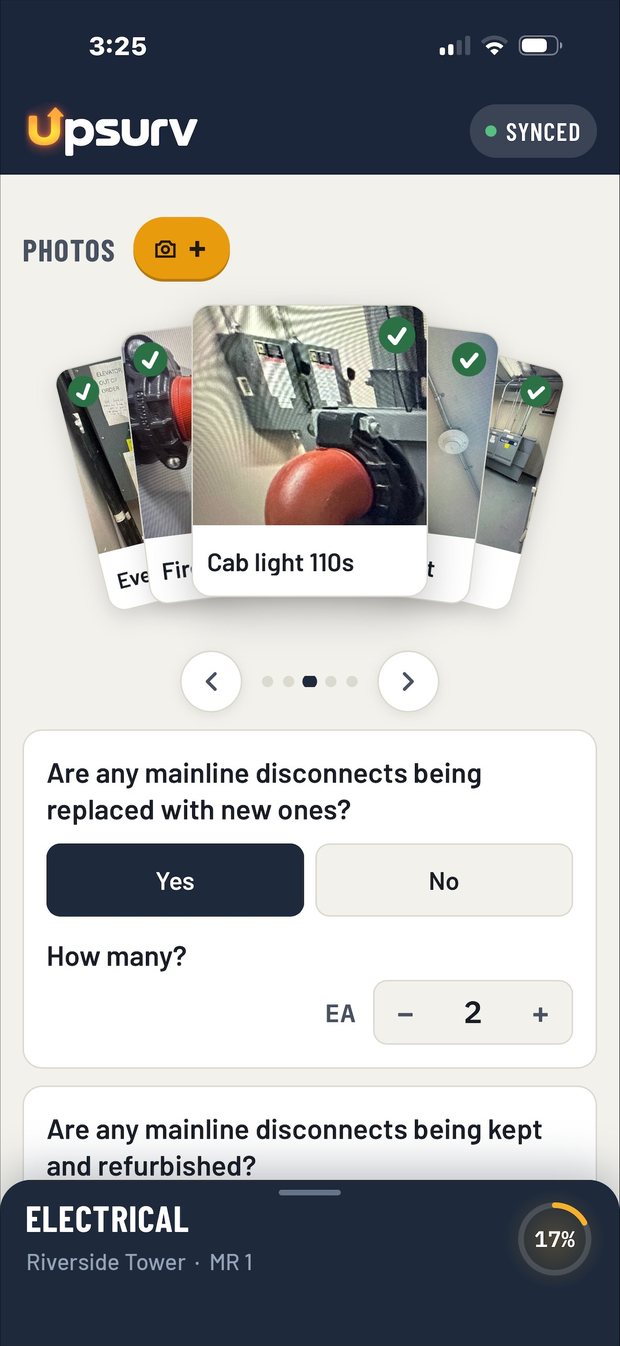
When it makes sense
If a spreadsheet, an off-the-shelf tool, or a simple form does the job, I’ll tell you. I build custom when the work is specific enough that nothing generic fits.
Surveys, inspections, deliveries, service calls—anything that happens on site, often with poor signal.
Once in the field, again at the office. The second entry creates room for errors and delays.
Workarounds, “other” boxes, and notes fields carrying the information that actually matters.
A web app for scheduling, approvals, or tracking that your current systems don’t cover.
How I build
Mobile or web, native or browser—I recommend the simplest approach that fits the devices, connectivity, and features the work requires. You review real, clickable screens before anything is finalized.
Start to finish, in the order the work really happens. What gets captured, what gets decided, and where it goes next.
A clickable prototype your team can try on their own devices. We adjust it around the actual workflow.
Connect the app to your database, job system, or knowledge base, with access scoped to what it needs.
Try it in the field, not just the office. Agree on who supports it and how it changes over time.
It depends on the devices, connectivity, and features the work requires. Field capture with photos and spotty signal usually points to mobile; office coordination and approvals usually point to a web app. I recommend the simplest approach that fits the task.
Yes, where supported access is available. Connections to your database, job system, or knowledge base are scoped alongside the app so it only touches what it needs.
Yes. Reviewing working screens and real workflows with your team is central to how I build. You’ll try it on your own devices well before it’s finished.
Only when the job calls for it. Most field tools are deployed privately to your team’s devices, which keeps rollout simple and avoids public listing.